Meetings aren’t just where work gets discussed. They’re where decisions are made and momentum builds. But without a reliable system for capturing what happens in meetings conversations, crucial insights tend to slip through the cracks.
That’s where AI-powered meeting assistants like Fireflies AI come in - to transcribe meetings and handle much more.
Over the past few years, Fireflies has gained serious traction among professionals who want to spend less time note taking and more time executing priorities.
It's an AI tool that promises more than just meeting transcripts. It aims to turn your team's meetings into searchable, shareable knowledge hubs, complete with AI powered summaries, key points, action items, and integrations that fit neatly into your existing workflows.
But how well does it actually perform? Does it live up to the AI-powered productivity hype, or are there areas where it still falls lacks the power of some of its competitors?
In this detailed Fireflies AI review, we’ll explore what the tool does best, where it still needs polish, and how it compares to what modern teams expect from their AI meeting assistants. And if Fireflies AI doesn’t quite check all your boxes, we’ll introduce you to one of the Fireflies AI alternatives that just might.
For more in-depth research, make sure to check out our guide on the best AI-note takers(2025).
What Is Fireflies AI?
Fireflies AI Origins
Fireflies AI didn’t just appear overnight. It’s the result of years of trial, learning, and relentless iteration. Launched by Krish Ramineni when he was just 20, the tool we know today emerged after seven failed product attempts, countless pivots, and a sharp focus on one powerful idea: what if meetings could be automatically remembered, organized, and transformed into actionable insights?
While studying at the University of Pennsylvania, Krish met co-founder Sam Udotong. Both were engineers by training, introverts by nature, and product-first in their thinking.
Instead of chasing growth hacks or hiring a sales team, they committed to building something so useful it could spread on its own.
Their earliest experiments involved Slack bots and automated to-do lists based on team conversations. But the real turning point came when Krish, while working at Microsoft, noticed how top-level execs relied on assistants to transcribe meetings. For everyone else, there was just...memory.
That gap became the foundation of Fireflies.
Fireflies AI Today
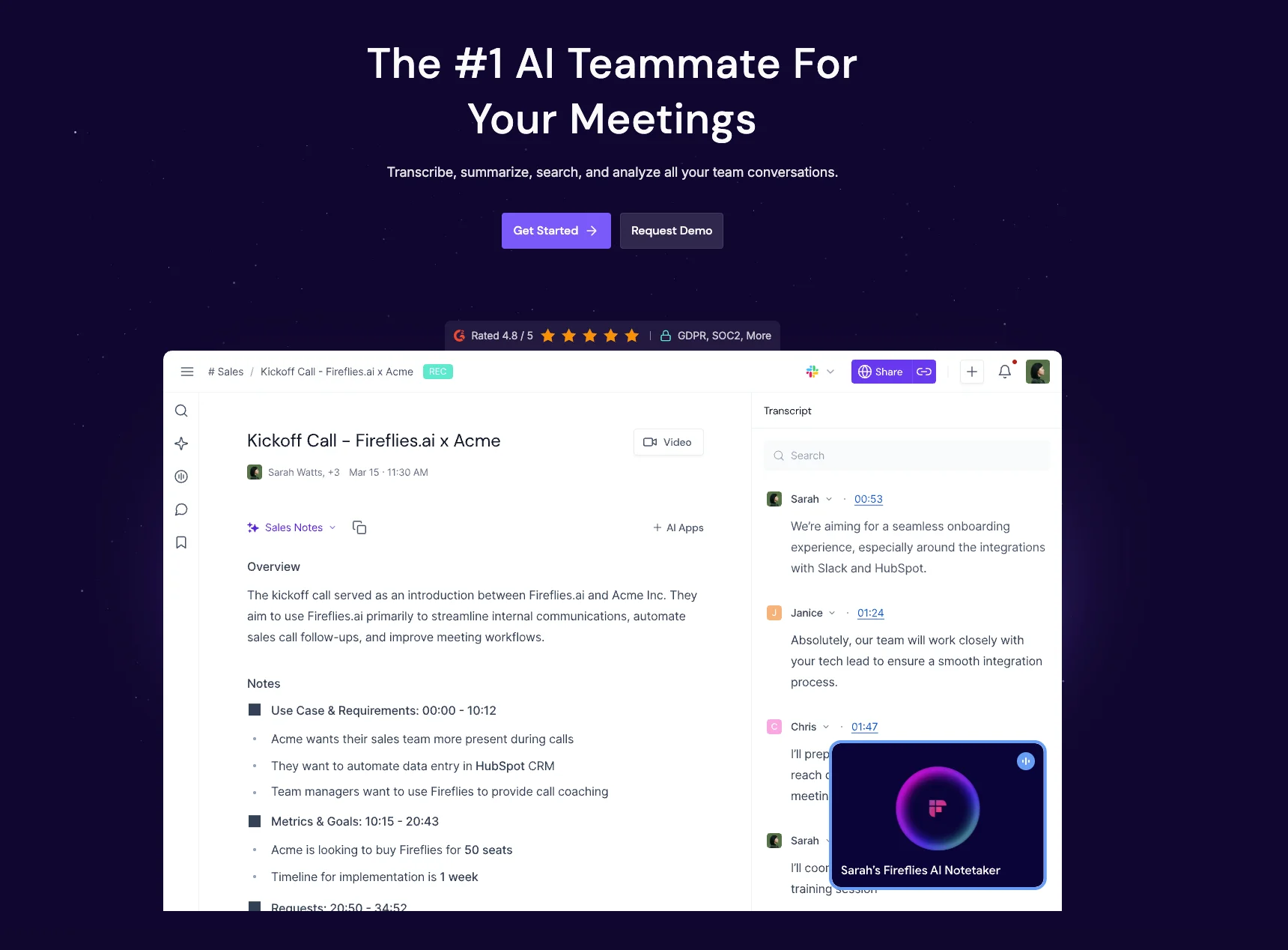
Today, Fireflies AI has grown into a solid AI meeting assistant. It works across platforms like Zoom, Microsoft Teams, and Google Meet, automatically transcribes conversations with impressive transcription accuracy, and generates AI-powered summaries, speaker insights, and action items.
And it's not just a passive AI note taking tool. It's actively evolving. In a recent push, the company released 200+ AI “mini apps” that pull role-specific insights from transcripts, allowing functions like sales, support, and marketing to get tailored value.
Fireflies AI seems to be a fast-growing platform shaping how we work and communicate in real time. And with its recent presence as a Gold Sponsor at the Generative AI Expo 2025, it's clear the company sees itself not just as a product, but as a leader in the AI productivity movement.
Fireflies AI: Key Features Breakdown
1. Smart Recording, On Your Terms
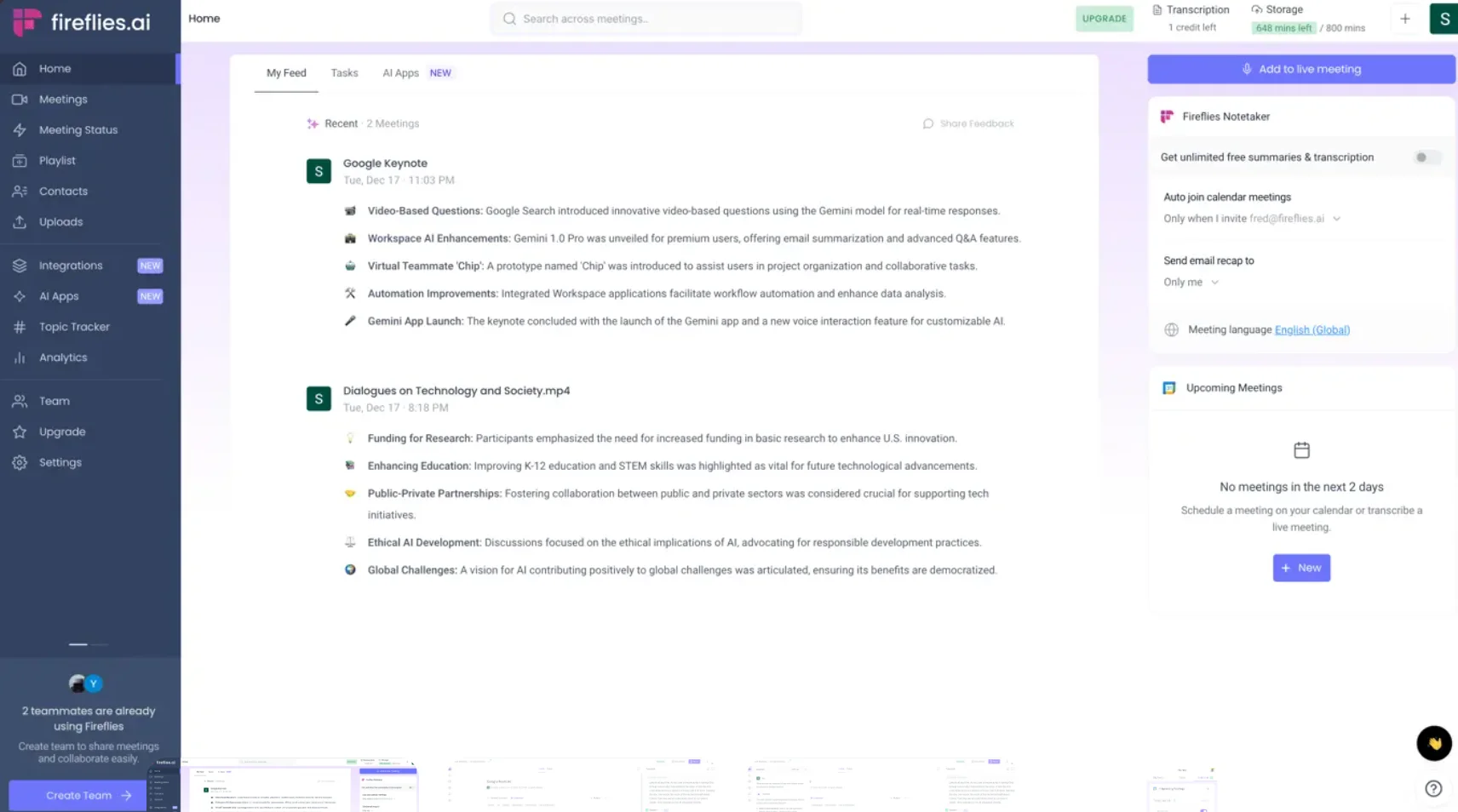
Fireflies starts with a flexible approach to recording meetings. Whether you're hosting a Zoom call, hopping into a quick meeting, or joining a Microsoft Teams huddle, Fireflies can be set to automatically join and transcribe meetings or be invited manually.
There’s no need for local recording, no special setup, just schedule the meeting, and Fred (that’s the AI assistant’s name) shows up to take notes in the background.
Bot-free recording is also available via Chrome extension and for the time being works only with Google Meets.
But the value isn’t limited to virtual calls. Fireflies’ mobile app lets you record in person meetings, external calls, brainstorms, and interviews, making it a practical tool for hybrid teams and professionals on the go.
2. Transcription Accuracy That Keeps Up
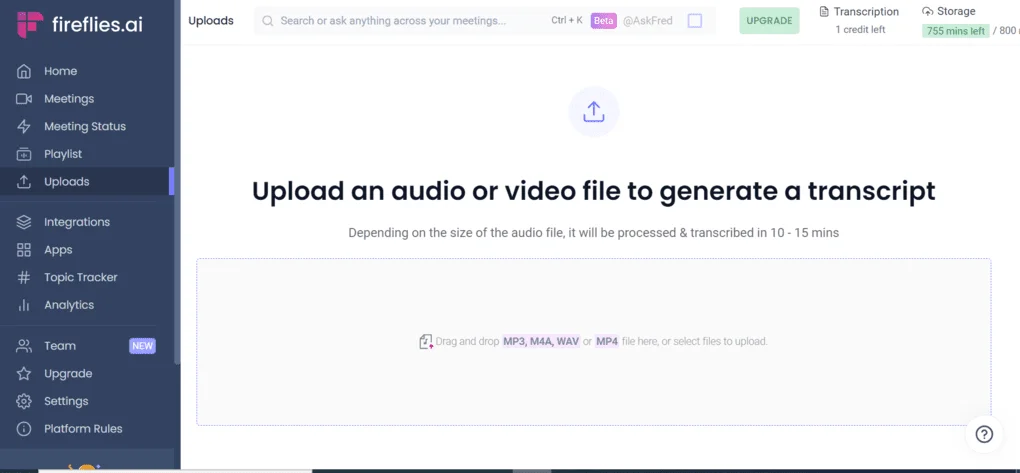
Once the meeting begins, Fireflies AI offers real time transcriptions. The live transcriptions update as people speak, letting you follow along or scroll back to revisit earlier moments without interrupting the conversation.
It can handle multiple speakers with clear labeling and even works across more than 100 languages, automatically detecting which one is being spoken.
Transcription accuracy is one of Fireflies’ strongest points, especially in clear audio environments. While heavy accents or background noise can still trip it up occasionally, it performs better than most tools in its class, and even allows users to upload audio or video files post-meeting for transcription.
3. AI-Powered Summaries: Notes Without the Work
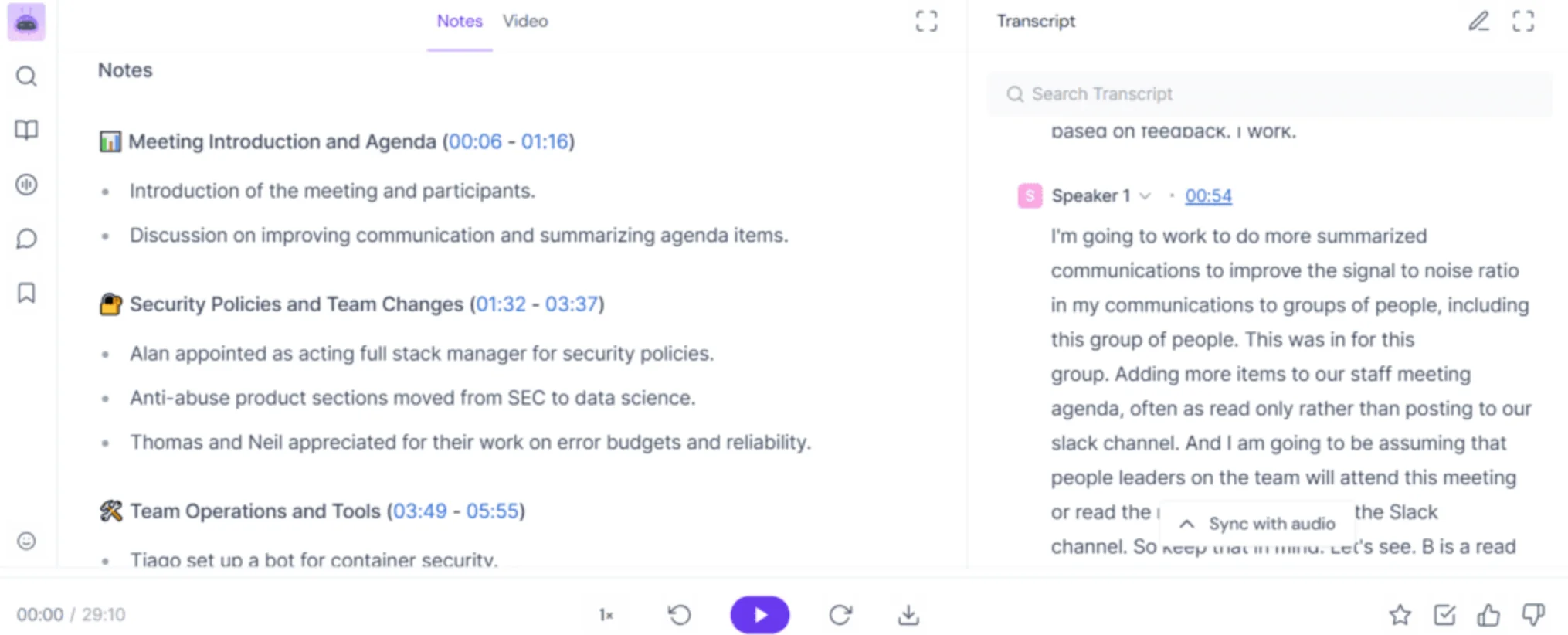
After the meeting is done, Fireflies processes the transcript of your team's meeting and delivers an AI Super Summary. This is a package that includes meeting highlights, key takeaways, bullet-point notes, keywords, and action points. You can skim an entire 45-minute call in under five minutes.
These summaries aren't static blocks of text. They're structured and organized so that each section of your meeting has a logical place: from decisions made, to follow-ups needed. While no AI summary is perfect, Fireflies does a more than a decent job distilling complex conversations into digestible insights.
4. Collaboration Features: Making Teamwork Effortless
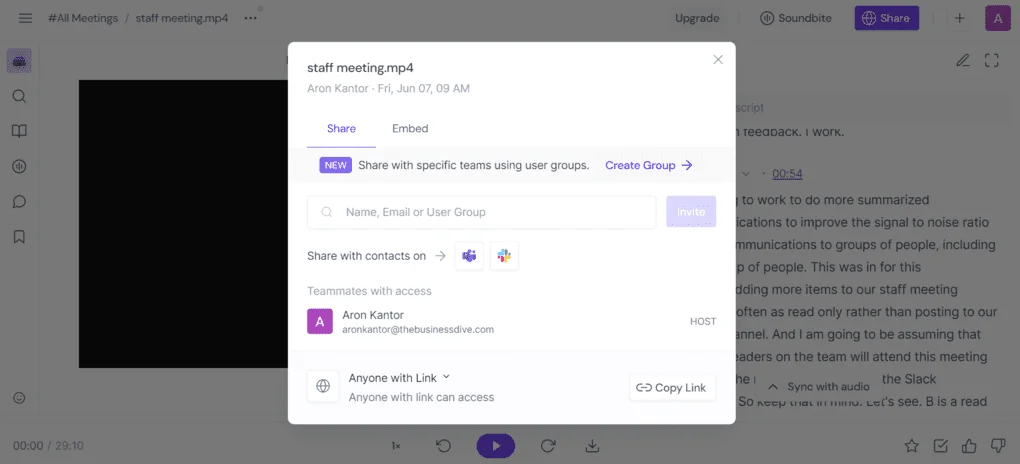
Fireflies is an AI assistant that turns every meeting into a shared resource with its collaborative features. Team members can leave comments, react to specific transcript sections, or flag important moments.
If someone missed the call, they don’t have to ask for meeting recaps. They can jump straight to the relevant part in the transcript or summary, even listening to synced audio at the same time.
This boosts cross-functional team collaboration, especially for distributed teams where context often gets lost in translation. Everyone can stay aligned, even if they weren’t present.
5. Search Like a Pro
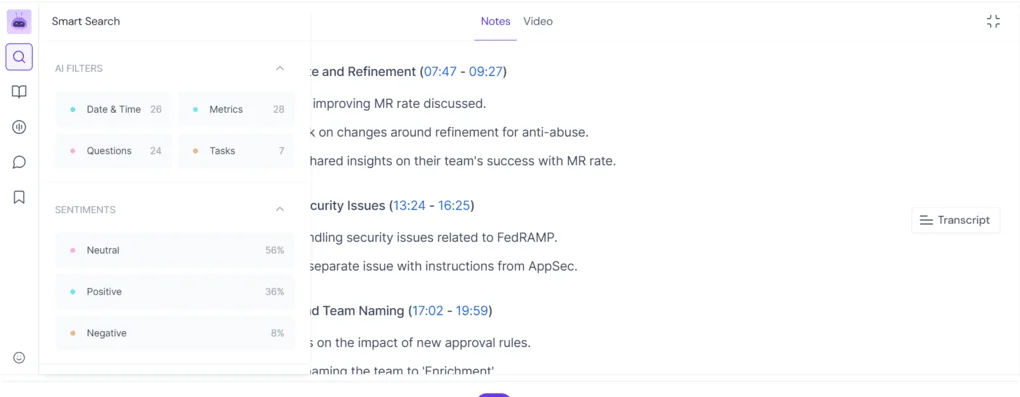
Instead of watching meeting recaps, Fireflies offers smart search functionality. Want to find the moment when someone mentioned pricing or a competitor? You can filter the transcript by keywords, dates, action items, speaker names, metrics, and more.
This isn't just keyword matching. It’s contextual, and surprisingly good at surfacing meaningful pieces of conversation. If your team has dozens of meetings a week, the search alone can save hours.
6. Integrations: Plug Fireflies Into Your Tech Stack
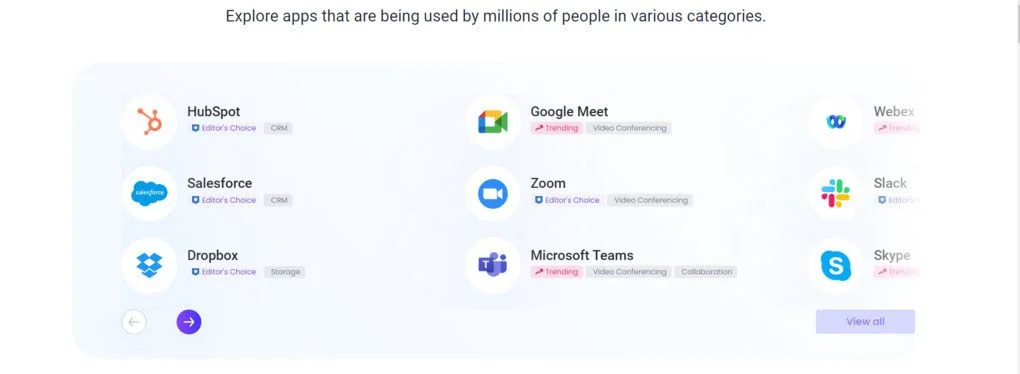
Fireflies doesn’t try to be the center of your workflow. It connects to the tools you already use. Meeting notes and transcripts can be automatically sent to Salesforce, HubSpot, Slack, Trello, Asana, Notion, Dropbox, and more. It also syncs with your calendar and records meetings without manual input.
These seamless integrations turn Fireflies into more than just a recorder. It becomes part of your system of record.
Sales teams can push call notes to their CRM for efficient deal tracking. Product managers can tag moments for their Jira boards. Customer success teams can share insights directly into Slack channels, as one of the additional collaboration features.
7. Conversation Intelligence & Analytics
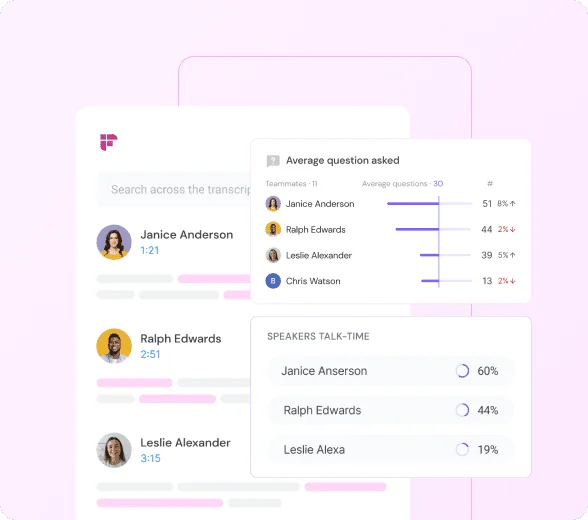
One of Fireflies’ more advanced key features is its conversation intelligence suite. This AI tool doesn’t just document your calls - it analyzes them. You get speaker talk time analysis, metrics on speaker balance, sentiment analysis and topic frequency.
These metrics are especially valuable for sales coaching, helping sales teams improve pitch timing, refine messaging, and identify high-performing behaviors across reps.
And this layer of analytics isn’t just pretty charts. it’s actionable. It shows where your team might be over-talking, which objections come up most, or how messaging is landing.
For organizations that rely heavily on conversations to drive outcomes, this is where Fireflies truly levels up from passive recorder to strategic asset.
Combined with its sales coaching features, this makes Fireflies a strategic tool for teams who rely on conversations to drive outcomes.
8. Fireflies AI Apps
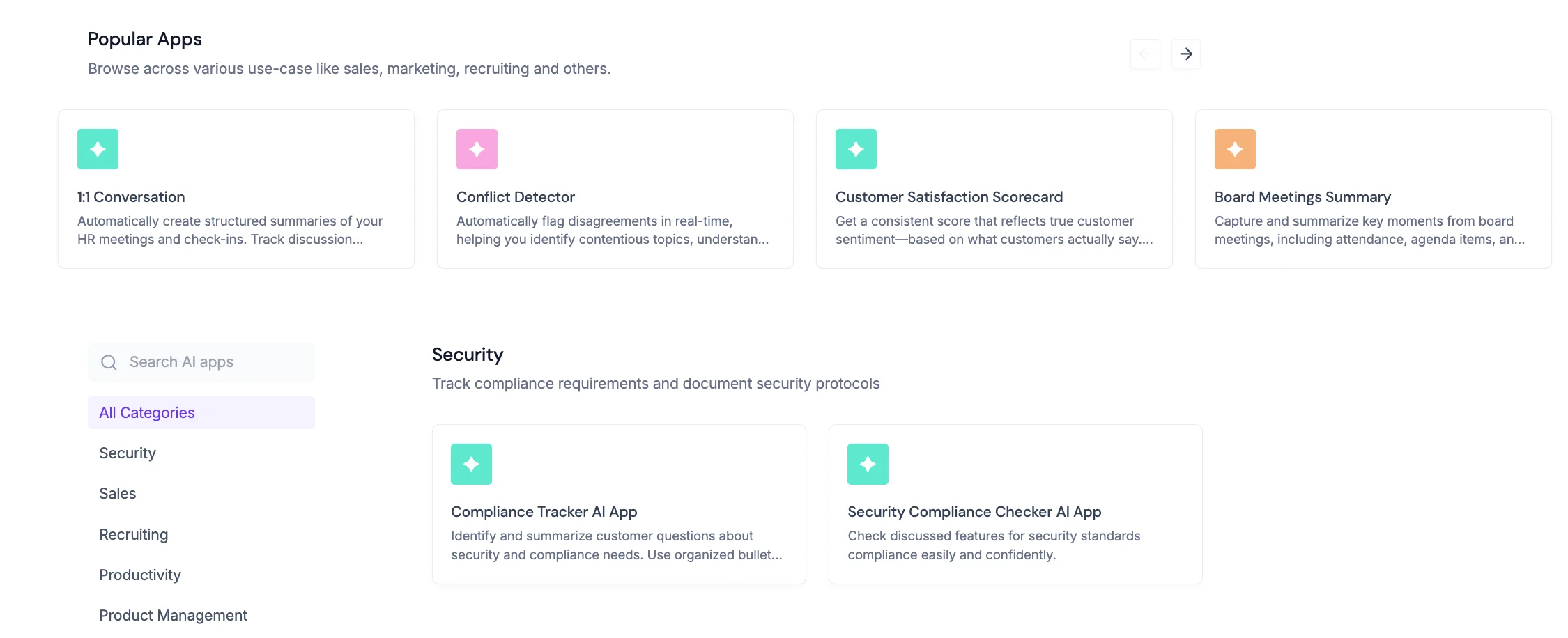
In April 2025, Fireflies introduced a game-changing suite of 200+ AI-powered apps built to automate workflows across departments and boost productivity even more - from logging CRM data and generating follow-up emails to building content calendars and tracking hiring performance. Sales teams and other busy executives can qualify leads faster, recruiters can assess fit with AI-generated scorecards, and product teams can auto-draft specs or flag usability issues.
What makes this even more innovative is how these apps are intelligently organized by industry and use case: from Sales and Recruiting to Healthcare, Education, and even Creativity.
Fireflies AI Meeting Assistant in Action
My Experience
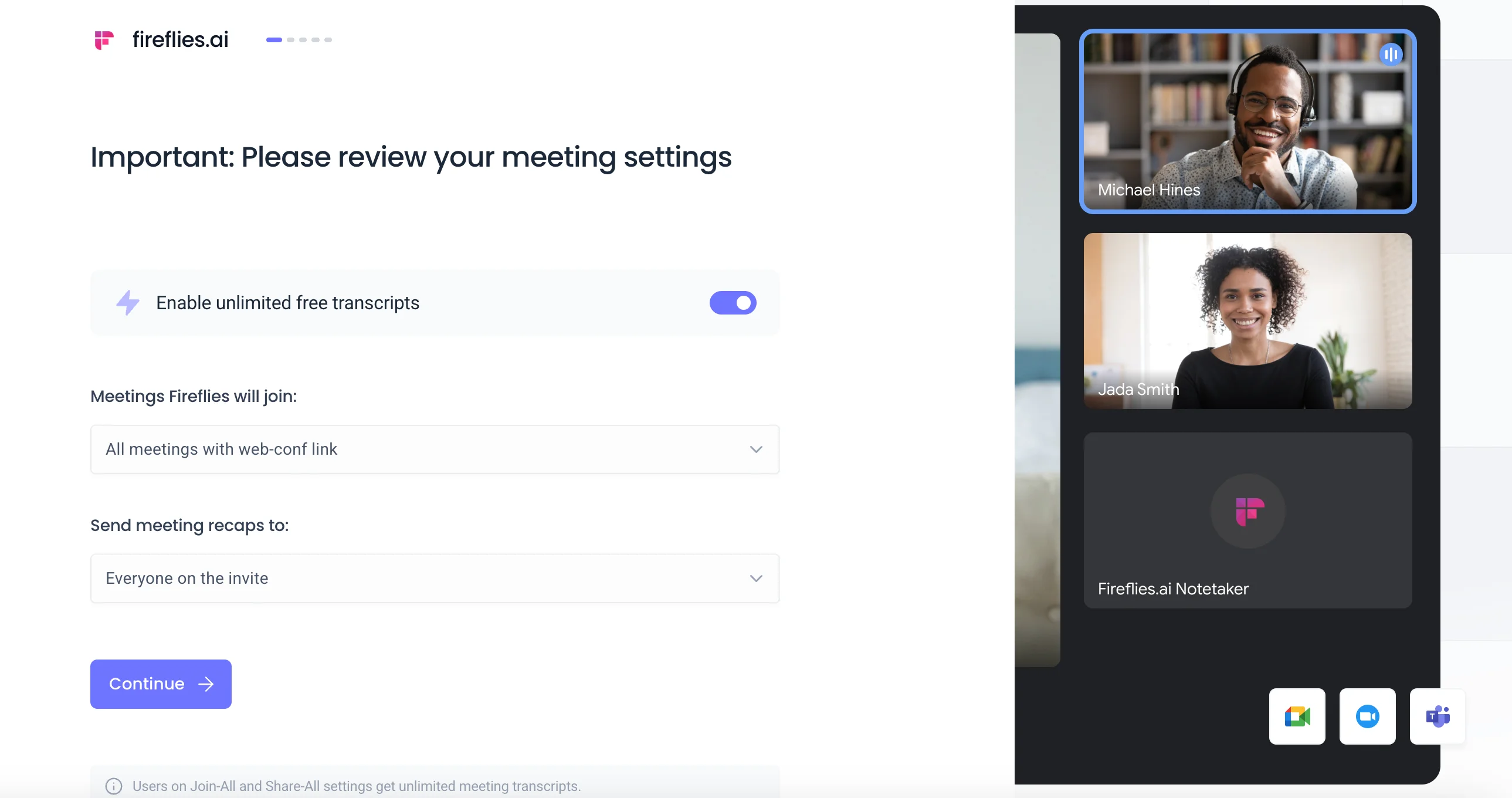
As someone who’s spent a good amount of time experimenting with productivity tools and AI note taking tools, I tested Fireflies with tempered expectations. This Fireflies AI review is based on hands-on testing across a range of real meetings - to evaluate how well it actually performs in a real-life workflow.
Autopilot Setup, With Some Rough Edges
The onboarding was super smooth. I connected my calendar and Zoom account, and Fireflies’ bot immediately started auto-joining scheduled meetings without any extra prompts or manual input. This level of automation is ideal if you're managing high meeting volume and just want things to “work.”
That said, the default behavior raised some flags: Fireflies not only joined calls but instantly pushed summaries to all attendees. A clever viral loop, sure - but not one I appreciated in internal calls or when dealing with clients.
You can disable this in the settings, but I’d argue this sort of sharing should be opt-in, not opt-out.
AI Summaries Accuracy: Impressive, With Caveats
The AI summary bullets were consistently solid: concise, structured, and generally around 90–95% accurate. Action items were labeled clearly, and the AI works surprisingly well when surfacing decisions and following action without needing explicit prompts.
That said, speaker labeling still needs polish. In faster-paced or cross-talk-heavy calls, the attribution sometimes slipped, which occasionally muddied the clarity of who said what.
To tighten the output, I took advantage of Fireflies’ custom vocabulary feature. It’s buried a bit in the settings, but once configured, it noticeably improved the recognition of product names and company-specific terminology.
If your meetings rely on internal lingo or niche phrases, tweaking custom vocabulary can make the summaries feel far more refined.
The Real Value: Search + Integrations
Where Fireflies really shines is post-meeting utility. Search is fast and effective. I could pull up key quotes or themes by speaker, keyword, or even topic tags. Add to that the push-to-Slack and Notion integrations, and you’ve got a workflow that moves meeting content out of silos and into action. I found myself relying on it not just for notes, but for drafting client recaps, populating CRMs, and syncing insights across tools.
The built-in sentiment analysis was a bonus. It's helpful for quickly gauging tone shifts in all my sales calls without rewatching the entire recording.
A Few Snags
Longer meetings (over an hour) did introduce processing lag, where it can sometimes take 10-15 to generate transcripts. Not a dealbreaker, but noticeable when you're trying to quickly move from one call to the next.
Also worth noting: some of Fireflies’ smarter features, like AI-powered follow-ups and deeper analytics are paywalled behind the Business plan. Fair, but something to consider depending on your team size and volume.
Real User Reviews
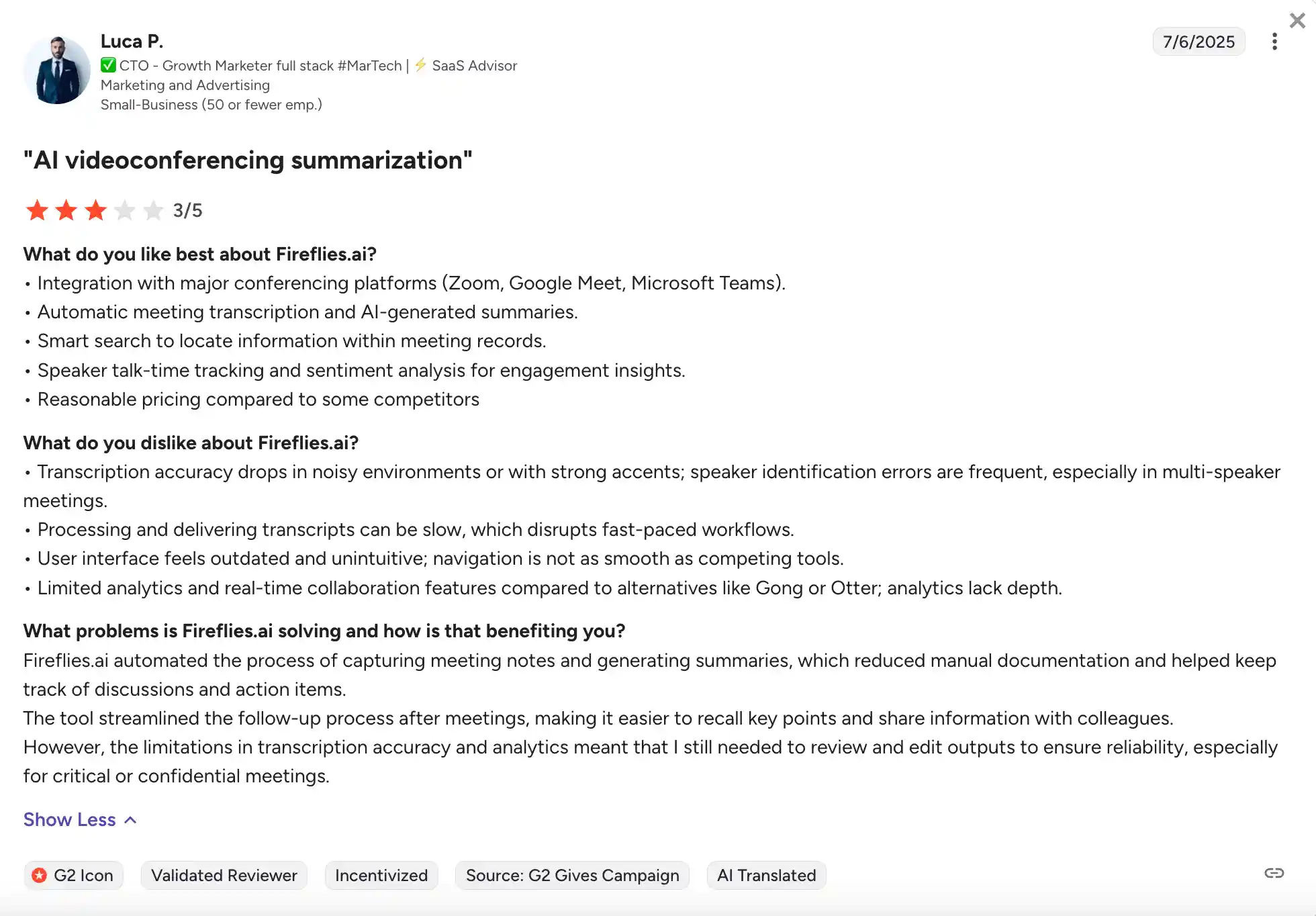
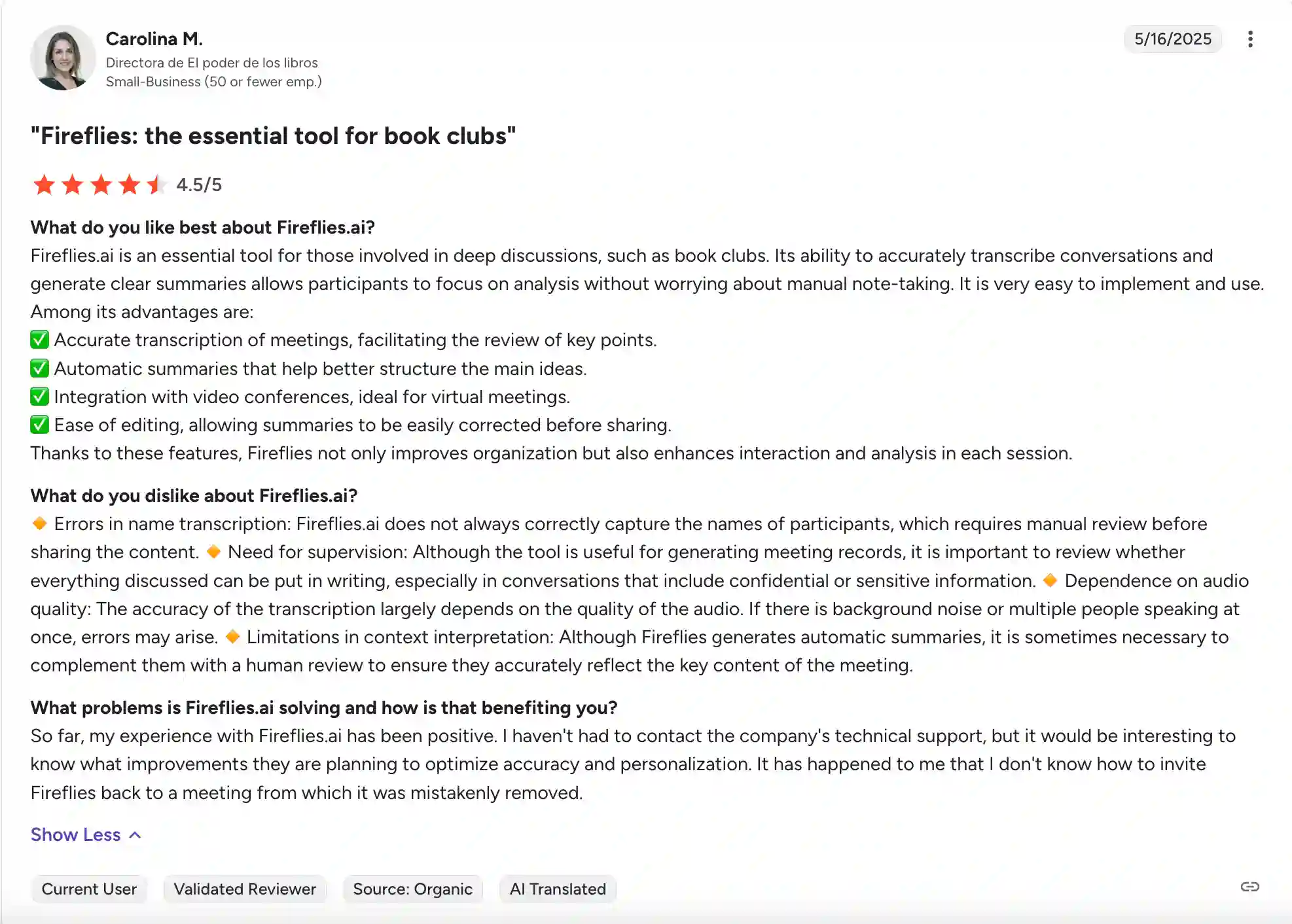
Source: G2.com
Fireflies AI Pricing Plans
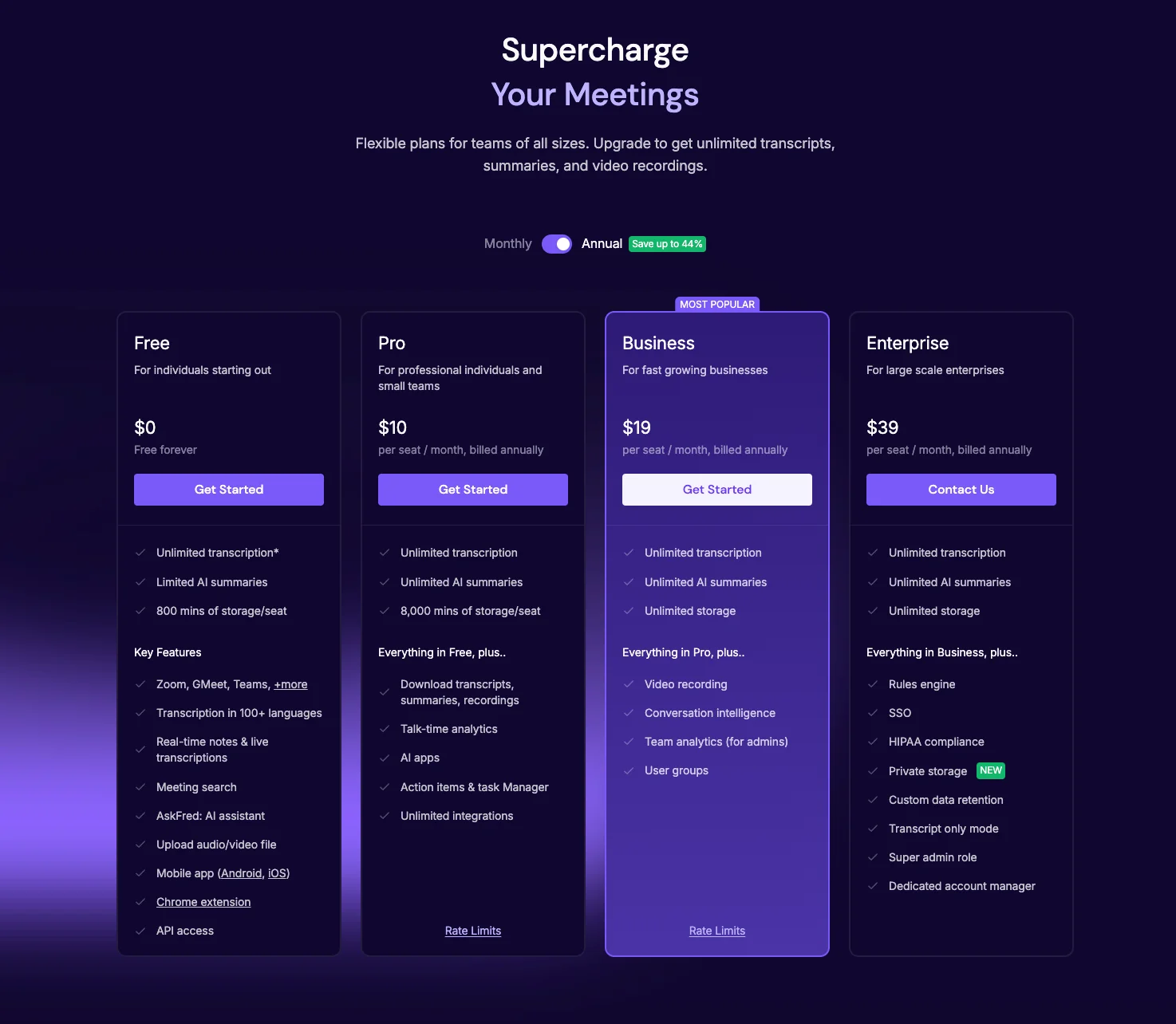
Fireflies AI offers four pricing tiers: Free plan and three paid plans: Pro, Business, and Enterprise, each designed to serve different user types.
Fireflies AI Free Plan Explained
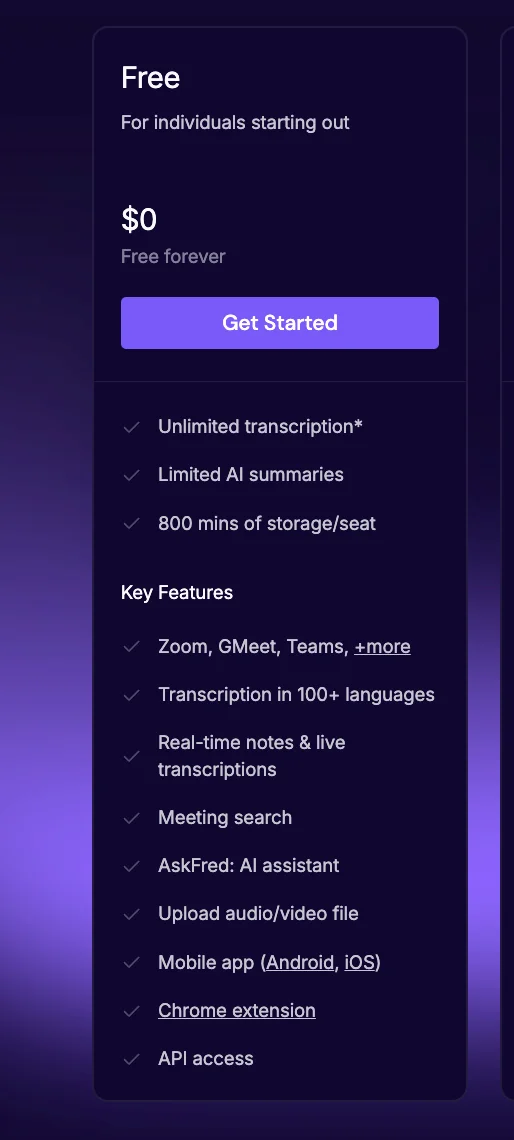
The Free plan is ideal for individuals or small teams just beginning with AI meeting tools. It includes unlimited transcription, though AI summaries are limited, and storage is capped at 800 minutes per seat. You get access to real-time notes, live transcriptions, meeting search, and AskFred.
It supports multiple web conferencing platforms like Zoom, Google Meet, and Teams, and is available via mobile apps and Chrome extension. You can also upload video/audio files for transcription.
While the features are generous for a free tier, many users report quickly bumping into usage limitations or storage caps, especially if using it for regular work meetings. It's also worth mentioning that Fireflies asks for your credit card even when you're starting out, which might irritate some users.
Fireflies AI Pro Plan Explained
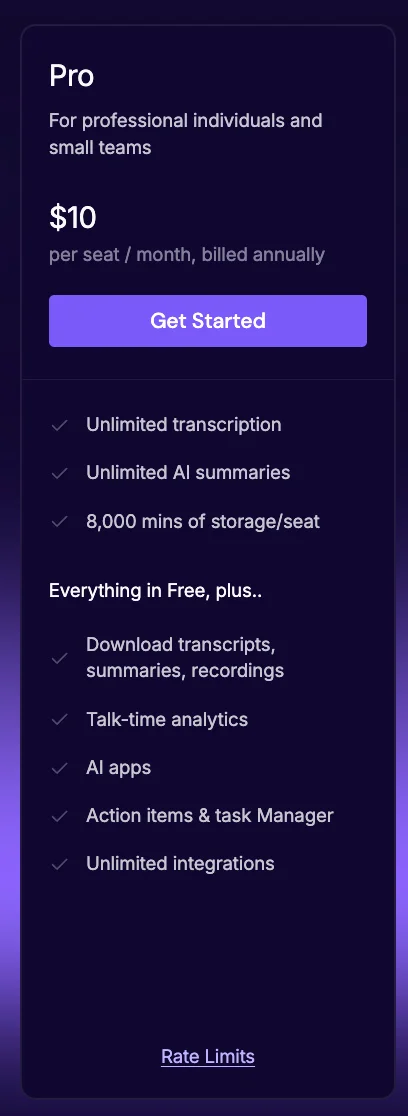
Fireflies’ Pro Plan ($10/user/month billed annually) unlocks unlimited transcription and unlimited AI summaries, expanding storage to 8,000 minutes per seat. This plan removes the most frustrating restrictions from the free tier, making it usable for real-world workloads.
Key additions include downloadable transcripts and summaries, talk-time analytics, and support for AI-powered action items and task tracking. The Pro plan also allows unlimited integrations. You also gain access to Fireflies’ AI apps and enhanced smart search filters, making it easier to dig through past conversations.
In summary, the Pro Plan offers solid functionality for tech-forward individuals or small teams, but its drawbacks, especially around trust and user control can be a dealbreaker.
Fireflies AI Business Plan Explained
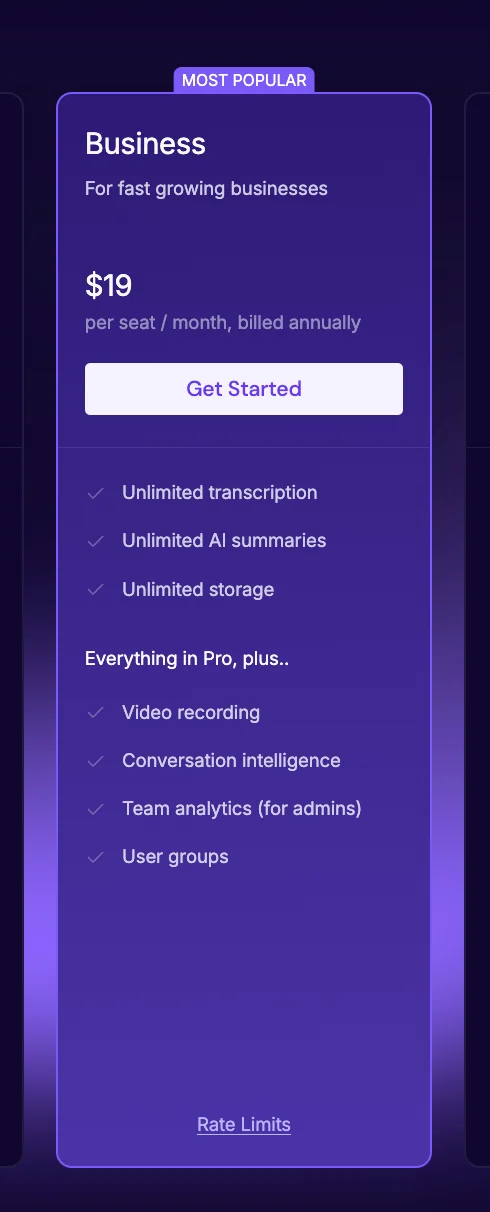
The Business plan is geared toward growing teams that need more power and collaboration features. Priced at $19 per user/month (billed annually), it builds on everything in the Pro plan with unlimited transcription, unlimited AI summaries, unlimited storage, and a robust suite of analytics tools.
You also gain access to video recording, conversation intelligence, and team analytics - perfect for sales coaching, performance reviews, or product feedback loops. Admins can manage user groups, and IT teams get access to deeper integrations and API controls.
Fireflies AI Enterprise Plan Explained
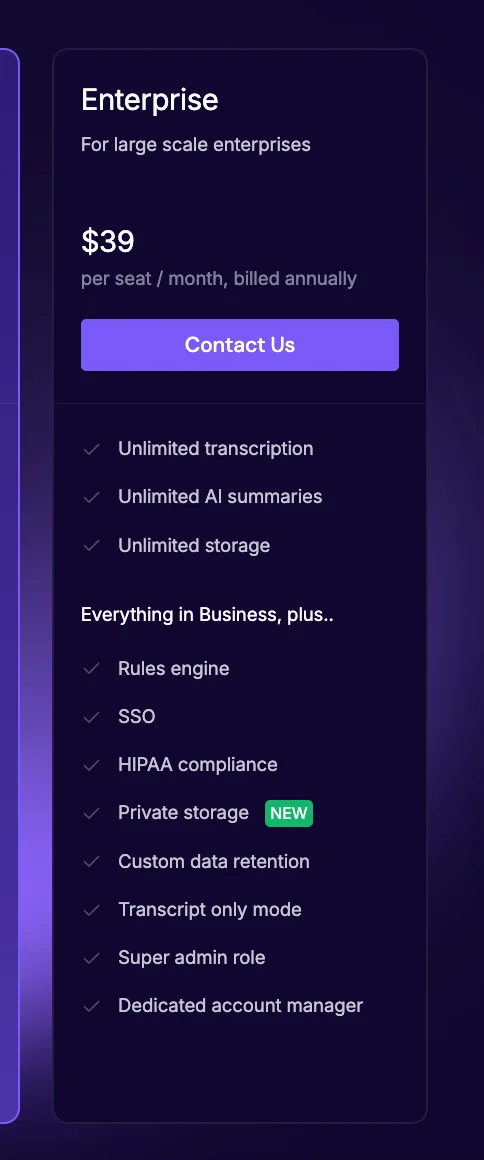
Der Enterprise-Tarif (39 USD/Benutzer/Monat) wurde für große Unternehmen mit strengen Compliance-Anforderungen und verbesserter Datensicherheit entwickelt. Neben unbegrenzter Transkription, Videoaufzeichnung und anderen Vorteilen beinhaltet es benutzerdefinierte Datenspeicherung, SSO, HIPAA-Konformität, privaten Speicher, eine Regel-Engine und einen eigenen Account Manager.
Bewertungen deuten jedoch darauf hin, dass die Upselling-Taktiken und die undurchsichtige Abrechnung viele Nutzer frustrieren. Wenn Ihre Organisation ein hohes Maß an Vertrauen und Transparenz benötigt, lohnt es sich, andere Optionen in Betracht zu ziehen.
Vor- und Nachteile von Fireflies AI
✅ Vorteile
1. Hohe Transkriptionsgenauigkeit mit benutzerdefiniertem Wortschatz und Transkriptionen in Echtzeit
Die KI-generierten Stichwortzusammenfassungen sind beeindruckend genau, insbesondere wenn sie mit benutzerdefiniertem Wortschatz erweitert werden. Das spart Zeit bei der Zusammenfassung von Besprechungen oder beim Extrahieren von Aktionspunkten.
In Kombination mit der Transkription in Echtzeit wird so sichergestellt, dass Sie die Konversation verfolgen können, während sie stattfindet.
2. Erweiterte Konversationsintelligenz
Fireflies bietet umfangreiche Einblicke wie Stimmungsanalysen, Aufschlüsselung der Gesprächszeiten und Themenerkennung und ist daher besonders nützlich für Vertriebscoachings, Interviews oder Kundenerfolgsteams.
3. Robuste Integrationen und Workflow-Synchronisierung
Mit direkten Integrationen in Slack, Notion, CRMs und Projektmanagement-Tools überträgt Fireflies Besprechungsinhalte mit minimaler Reibung in die bestehenden Arbeitsabläufe Ihres Teams.
4. Intelligente Suche und Archivierung
Die Suche nach Schlüsselwörtern und Lautsprechern ist schnell und präzise. Themen-Tags und Filter helfen dabei, innerhalb von Sekunden die richtigen Momente aus Stunden vergangener Anrufe zu finden.
5. Erschwinglicher Pro-Tarif
Für 10$ pro Nutzer/Monat beinhaltet der Pro-Tarif eine unbegrenzte Anzahl von Zusammenfassungen, Integrationen, Analysen und Aktionselementen und ist damit eines der großzügigeren Angebote der mittleren Preisklasse in diesem Bereich.
🚫 Nachteile
1. Ungenauigkeiten bei der Kennzeichnung von Lautsprechern
Bei Besprechungen mit mehreren Rednern und schnellem Tempo kann es vorkommen, dass die Zuordnung von Sprechern zu kurz kommt oder nicht, was sich auf die Suchgenauigkeit und den Kontext auswirkt.
2. Zusammenfassung Verzögerungen und Drosselung
Bei langen Besprechungen kann es 10—15 Minuten dauern, bis Zusammenfassungen und Transkripte erstellt werden. Bei starker Nutzung können einige KI-Funktionen gedrosselt werden.
3. Aggressive Standardeinstellungen
Standardmäßig nimmt Fireflies an jedem Kalenderereignis teil und teilt Besprechungsnotizen mit allen Teilnehmern — eine effektive Viralitätstaktik, die jedoch aufdringlich ist. Sie kann ausgeschaltet werden, sollte aber nicht abgewählt werden.
4. Mögliche Bedenken hinsichtlich des Datenschutzes
Fireflies AI legt großen Wert auf Sicherheit, aber der standardmäßige US-Datenspeicher kann den DSGVO-Anforderungen widersprechen. Die Stimmungsanalyse wirft nach EU-Recht zusätzliche Bedenken hinsichtlich Datenschutz und Vorurteilen auf. Zwar gibt es eine private Cloud-Option, aber einige Nutzer berichten, dass der Bot auch nach der Kontolöschung an Besprechungen teilnimmt, was Fragen zur Datenkontrolle und Einwilligung aufwirft.
5. UI-Lernkurve
Trotz umfangreicher Funktionen kann nicht gesagt werden, dass Fireflies AI über eine intuitive Oberfläche verfügt, da sie sich überfüllt anfühlen kann und weniger technisch versierte Benutzer sie zunächst als überwältigend empfinden. Unnötige Hover-Elemente, aufdringliche KI-Popups, langsame Seitenladevorgänge und verzögerte KI-Antworten (bis zu 10 Sekunden) tragen zu einer merklich frustrierenden Benutzererfahrung bei.
Wer sollte Fireflies AI verwenden?
Der KI-Meeting-Assistent von Fireflies eignet sich am besten für Profis und Teams mit einem hohen Besprechungsvolumen, denken Sie an 10 oder mehr Besprechungen pro Monat, die das Aufzeichnen von Notizen optimieren, manuelle Dokumentation vermeiden und Erkenntnisse nach dem Meeting verwertbar machen möchten.
Wenn Ihr Workflow darauf beruht, vergangene Konversationen zu überprüfen, Follow-ups zuzuweisen und wichtige Momente mit Tools wie Slack, Notion oder Ihrem CRM zu synchronisieren, bietet Fireflies einen starken ROI.
Durch die automatische Join-Funktion und die genauen, KI-generierten Zusammenfassungen ist es ideal für Teams in den Bereichen Vertrieb, Kundenerfolg, Beratung und Betrieb. Die durchsuchbaren Transkript-Archive, die Themen-Tagging und die Filter auf Sprecherebene sind unglaublich nützlich, wenn Sie es mit einem schnellen Tempo zu tun haben
Allerdings ist Fireflies AI nicht wirklich für Light-User konzipiert. Wenn Sie nur an einer Handvoll Besprechungen pro Monat teilnehmen oder keine detaillierte Dokumentation benötigen, fühlt sich die Automatisierung möglicherweise übertrieben an. Auch wenn die Plattform sich durch Zusammenfassungen und Integrationen auszeichnet, gibt es immer noch Verbesserungspotenzial in Bezug auf die Genauigkeit mehrerer Sprecher und das Verhalten der Bots.
Für Teams, die auf Konversationen angewiesen sind, um Entscheidungen zu treffen, geht Fireflies jedoch weit über einfache Transkriptionen und Besprechungsnotizen hinaus. Wichtige Funktionen wie benutzerdefiniertes Vokabular und die Integration in Ihre täglichen Tools machen es zu einem leistungsstarken KI-Besprechungsassistenten.
Entwickelt sich die KI von Fireflies in die richtige Richtung?
Die KI von Fireflies wächst unbestreitbar schnell: jedes Quartal neue Funktionen, neue Integrationen und eine übersichtlichere Benutzeroberfläche. Doch mit dieser rasanten Entwicklung geht eine wichtige Frage einher: Bleibt sie dem treu, was KI-Notizen wirklich wertvoll macht?
Ursprünglich zeichnete sich Fireflies durch sein Kernversprechen aus — automatisierte, genaue Besprechungsnotizen, die Zeit sparen. Und in vielerlei Hinsicht leistet es immer noch mehr als einen ordentlichen Job.
Echtzeit-Transkriptionen und durchsuchbare Archive sorgen dafür, dass es für Teams relevant ist, die Dutzende von Besprechungen pro Monat abhalten. In letzter Zeit scheint sich die Roadmap jedoch etwas zu weit zu verbreiten. Von der KI-gestützten Suche über Konversationsanalysen, Deal-Intelligence, Stimmungsauswertung bis hin zu KI-Chatbots läuft Fireflies Gefahr, zu einem Alleskönner zu werden und nicht zu einem Meister der einen Sache, die Nutzer wirklich brauchen: zuverlässige, kontextsensitive Besprechungsnotizen.
Diese Erweiterung des Anwendungsbereichs kann das Benutzererlebnis verwässern. Anstatt die Lautsprechererkennung zu verfeinern oder die Extraktion von Aktionspunkten zu verbessern, scheinen die Ressourcen für Funktionen verwendet zu werden, die sich eher anspruchsvoll als praktisch anfühlen. Das Ergebnis ist ein Produkt, das immer komplexer zu bedienen ist und gelegentlich frustrierend zu steuern ist.
An Ehrgeiz ist nichts auszusetzen. Aber für Benutzer, die einfach nur Transkripte und intelligente Zusammenfassungen mit übersichtlichen Integrationen erstellen möchten, ohne zehn Einstellungen konfigurieren oder automatischen Einladungen ausweichen zu müssen, kann sich die Fokusverlagerung wie eine Abweichung anfühlen.
Um immer einen Schritt voraus zu sein, muss Fireflies möglicherweise eine Pause einlegen, seinen Power-Usern genau zuhören und sich auf die Grundlagen konzentrieren: Transkriptionsgenauigkeit, Sprecher-Tracking und Workflow-Flexibilität. Andernfalls besteht die Gefahr, dass es zu einer aufgeblähten Produktivitätssuite wird, anstatt der KI-Notizbüchler zu bleiben, dem die Teams tatsächlich Tag für Tag vertrauen.
Endgültiges Urteil: Sollten Sie in das Fireflies AI Tool investieren?
Fireflies AI bietet einen überzeugenden Funktionsumfang für Teams, die ein hohes Volumen an Besprechungen sowie persönliche Besprechungen abwickeln. Mit automatisierter Teilnahme an Besprechungen, Live-Transkriptionen, genauen Zusammenfassungen und einer Vielzahl von Integrationen dient es als praktisches Tool für die Erfassung und Organisation von gesprochenen Inhalten in großem Maßstab.
Für Profis, die sich regelmäßig auf Plattformen wie Zoom, Meet oder MS Teams verlassen, kann Fireflies den Bedarf an manueller Bearbeitung der Besprechungsdokumentation erheblich reduzieren.
Das heißt, es ist nicht ohne Macken. Die Standardeinstellungen können schnell nervig werden, wenn man sie nicht gleich anpasst. Außerdem stolpert die Lautsprecherbeschriftung in schnellen Chats mit mehreren Personen manchmal ins Stocken, was bedeutet, dass Sie die Transkripte überprüfen sollten, wenn Ihnen die Richtigkeit sehr wichtig ist.
Die Preisstruktur ist ein weiterer Faktor, über den es sich zu erwägen lohnt. Der kostenlose Tarif ist zwar großzügig genug, um das Terrain zu sondieren, aber viele der erweiterten Funktionen sind nur in kostenpflichtigen Tarifen verfügbar. Diese Konfiguration zwingt Sie dazu, schneller auf einen kostenpflichtigen Tarif umzusteigen, als manche Benutzer vielleicht erwarten, insbesondere, wenn Sie Zugriff auf Konversationsinformationen oder unbegrenzte Transkription oder nur Videoaufzeichnungen wünschen.
Also, ist Fireflies AI es wert? Für vielbeschäftigte Profis und Teams, die einen funktionsreichen, halbautomatischen KI-Besprechungsassistenten suchen und dem gelegentliche Schluckauf nichts ausmachen, ist es sicherlich ein Kandidat.
Aber wenn Sie sich nach einem reibungsloseren, datenschutzbewussteren Erlebnis mit weniger Upselling-Druck sehnen, oder wenn Sie einen KI-Notiznotizen wollen, der einfach funktioniert Ohne zusätzlichen Aufwand möchten Sie vielleicht einige neuere Alternativen ausprobieren, die Wellen schlagen.
Am Ende hat Fireflies AI das Potenzial, fühlt sich aber auch so an, als würde sie immer noch ihren wahren Fokus finden. Das lässt Raum für andere, einzugreifen und ein saubereres, benutzerfreundlicheres KI-Assistenten-Erlebnis zu bieten.
Ein kurzer Hinweis: Es gibt auch Glühwürmchen-Alternativen
Da wir uns dem Ende dieses Fireflies KI-Testberichts nähern, ist es erwähnenswert, dass es definitiv Alternativen für Leute gibt, die einen einfacheren, respektvolleren Ansatz beim Notieren suchen - Tools, die Ihren Kalender oder Ihren Posteingang nicht mit Lärm überfluten.
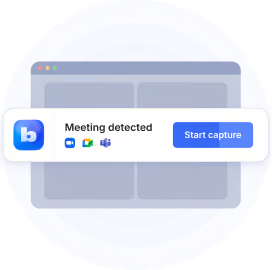
Einer von ihnen ist Blauer Punkt, ein neueres KI-Notizbuch, das die gesamte „Bot nimmt an jedem Anruf teil“ -Routine komplett überspringt. Stattdessen zeichnet es Besprechungen direkt von Zoom, Google Meet oder MS Teams auf — keine Popups, keine umständlichen automatischen Einladungen und keine Spam-Threads nach dem Anruf, was eine direkte Videoaufzeichnung ermöglicht.
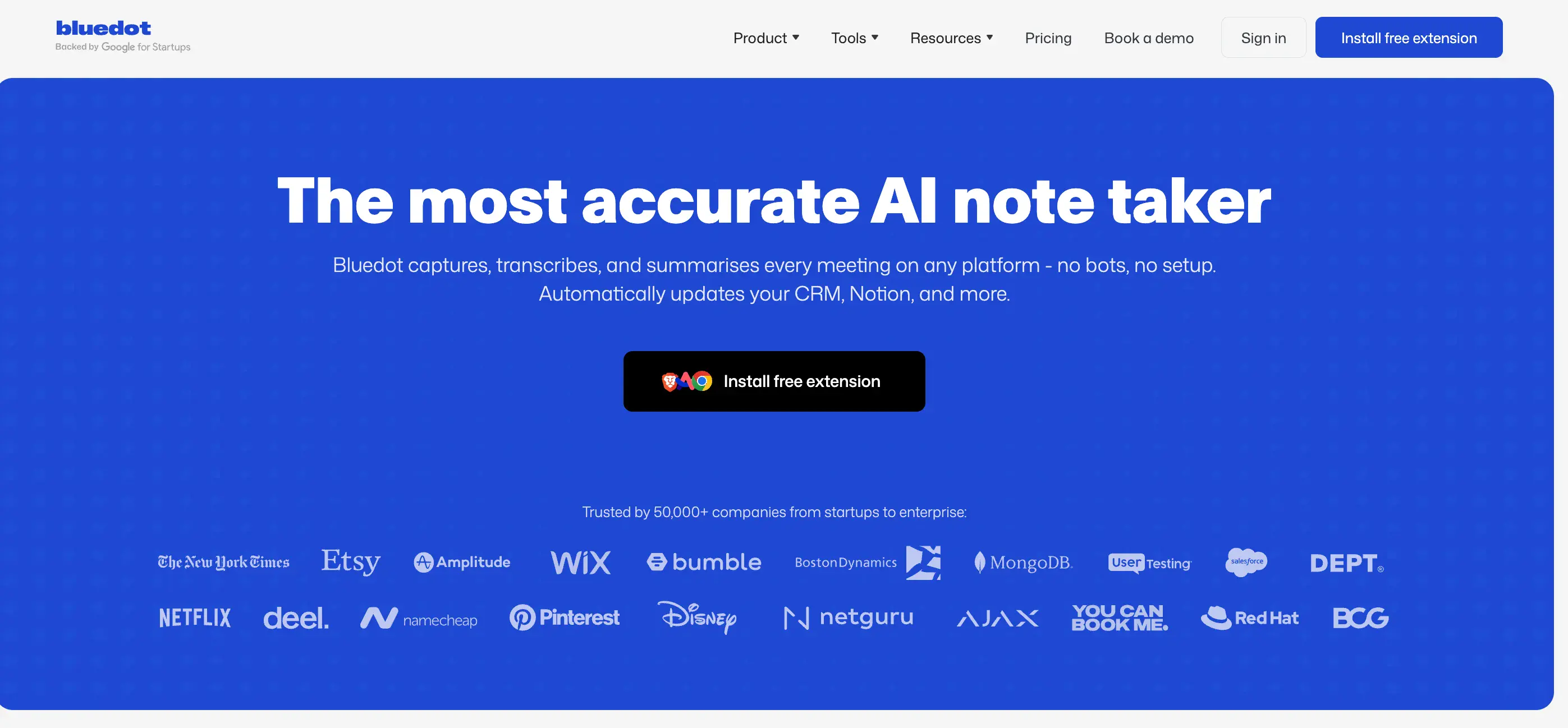
Bei Bluedot stehen Genauigkeit und Datenschutz an erster Stelle. Es generiert Zusammenfassungen selbst in schnellen, chaotischen Konversationen und ermöglicht es Ihnen, diese mit den integrierten oder benutzerdefinierten Vorlagen zu verbessern.
Die Oberfläche ist sauber, die Analysen sind nützlich und sie lässt sich in die Tools integrieren, die Teams tatsächlich verwenden, wie Slack, Notion und HubSpot. Sie werden nicht jedes auffällige Feature unter der Sonne finden, aber Sie Testament finde ein Tool, das so gebaut ist, dass es funktioniert, ohne dir in die Quere zu kommen.
Für Teams, die die aufgeblähten Dashboards und den verkäuferischen KI-Hype satt haben, fühlt sich Bluedot wie ein frischer Wind an — elegant, effizient und respektvoll mit Ihrer Zeit und Ihren Daten.


.png)