Google AI Edge Foresight is a free Mac app that transcribes meetings and turns your rough notes into fuller ones. It processes conversations on your computer instead of sending them to cloud AI. In this Google AI Edge Foresight review, we'll look at how well those features work and whether the app is really offline.
Google already offers Gemini for taking meeting notes in Google Meet. Foresight takes a different approach: it captures audio directly from your Mac, so you can use it with Zoom and Teams too, without adding a bot. That sounds convenient, especially if you care about privacy. But there's more to a good meeting note taker than keeping your conversations off the cloud. Let's see what Foresight actually has to offer.
What Is Google AI Edge Foresight?
Google released AI Edge Foresight on October 6, 2026. It's a free, experimental desktop app, separate from Google AI Edge Gallery on mobile.
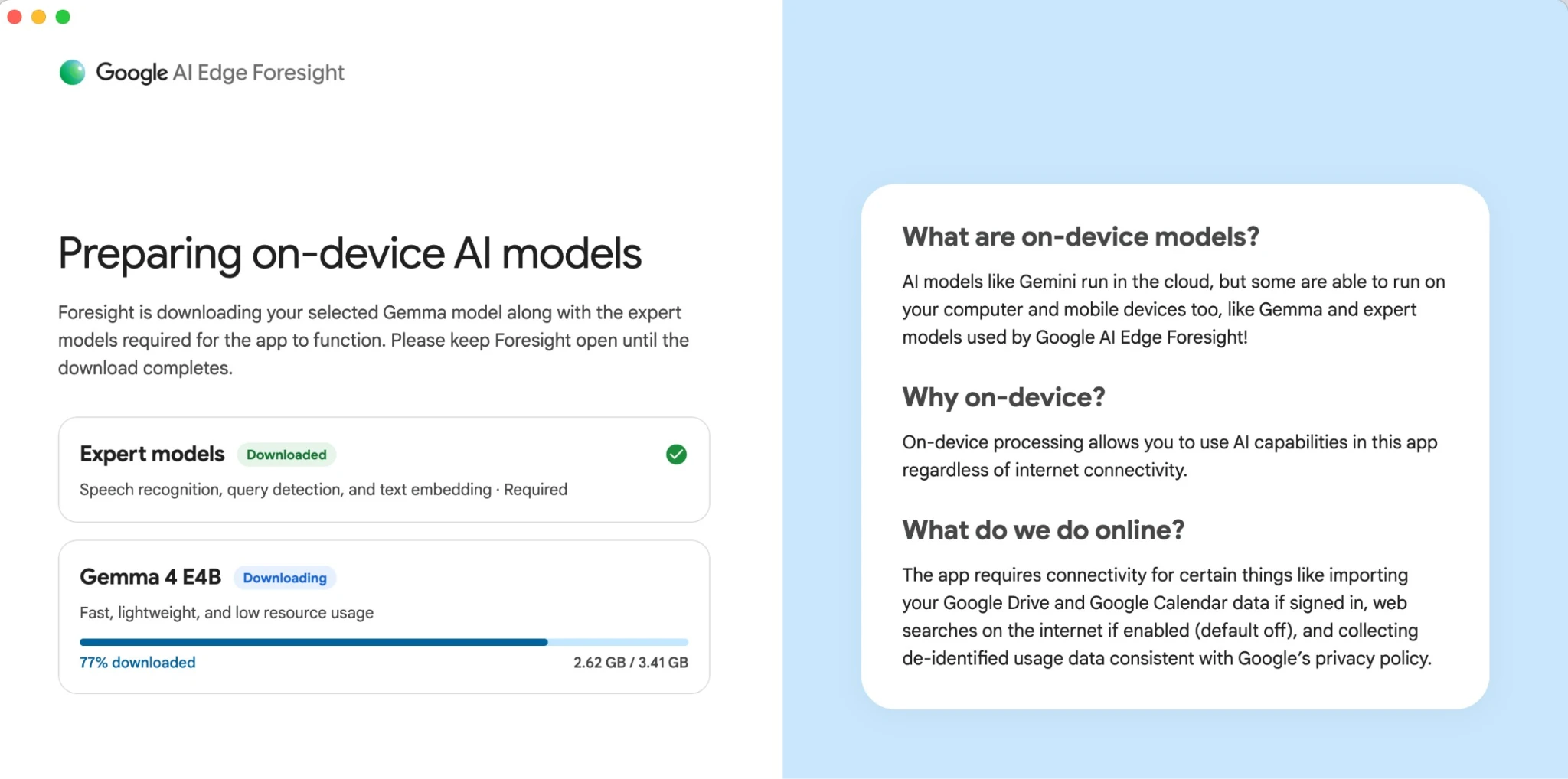
Foresight uses two Google AI models that run locally on your Mac. Gemma 4 turns conversations into notes and answers your questions, while EmbeddingGemma 2 helps the app find information in meeting transcripts and reference files, including images. None of this requires sending your meeting content to a cloud AI model.
Instead of producing only a transcript, Foresight expands the shorthand you type during a call. That differs from many of the best AI note takers, which focus on recording and generating notes afterward.
Mac Requirements and Setup
This AI note-taker for Mac requires Apple Silicon (M1 or newer). It has no Windows, Intel Mac, iPhone, or Android version.
You'll need an internet connection to download the AI models before your first recording. After that, you can transcribe meetings and generate notes without Wi-Fi. You don't need a Google account either, unless you want to connect Google Drive or Calendar.
Just make sure you have enough free space on your Mac. The models take up several gigabytes, and Foresight needs additional storage for the app and your files.
How Google AI Edge Foresight Works in Meetings
Foresight gives you a live transcript, helps you write meeting notes, and can answer questions using your files. Here's what you can do with it.
Recording a Call Without a Bot
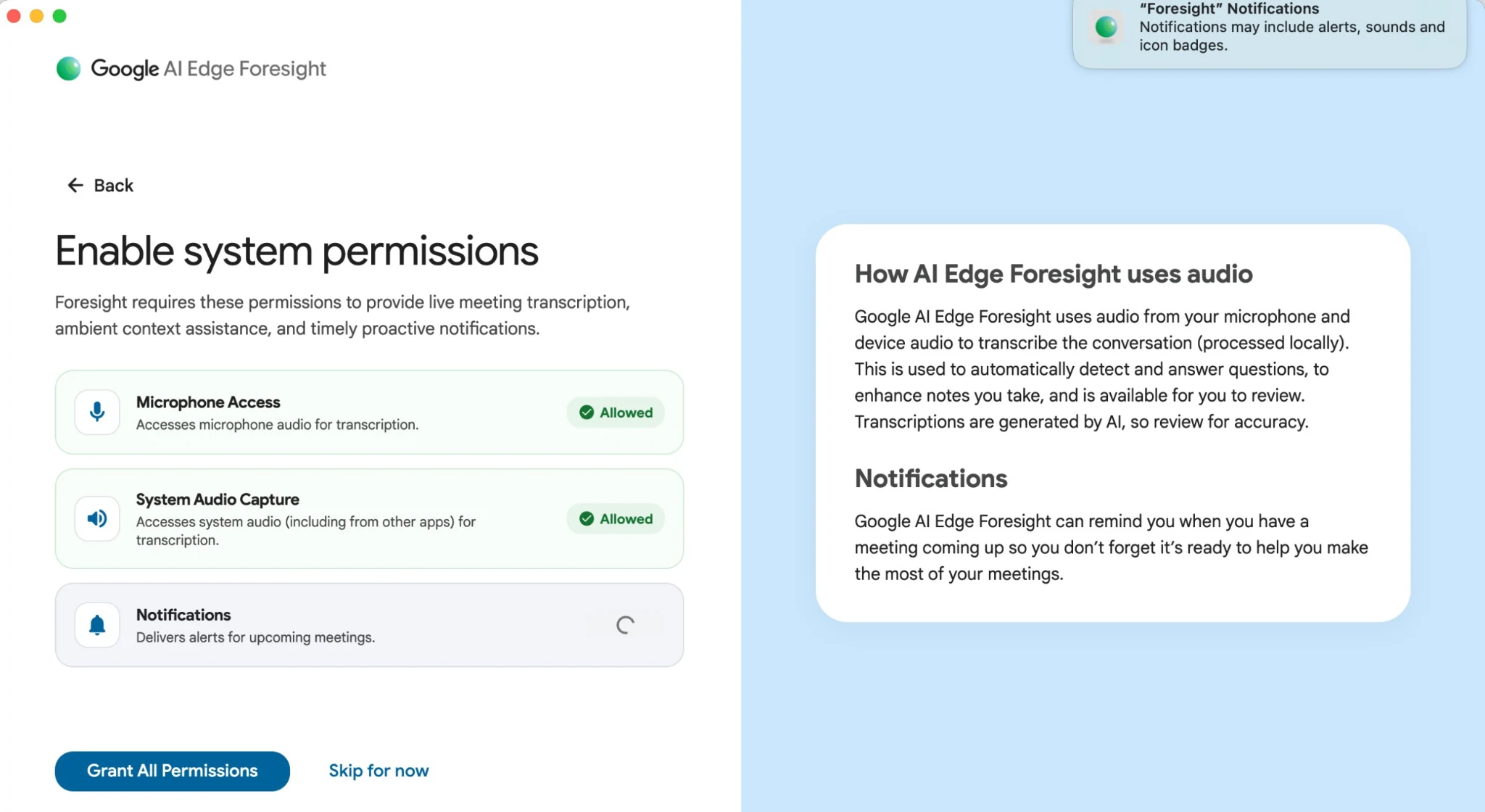
Foresight captures meeting audio from your microphone and Mac during a call. You start transcription manually, and no bot joins the meeting.
It works with Google Meet, Zoom, and Teams without separate integrations. So if you're comparing AI note takers for Google Meet, AI note takers for Zoom, and Microsoft Teams AI note takers, Foresight is an option for all three.
There is one limitation, though. The transcript separates your microphone from system audio but doesn't identify individual speakers. If you're on a group call, you'll have to keep track of who said what yourself.
Turning Shorthand Into Finished Notes
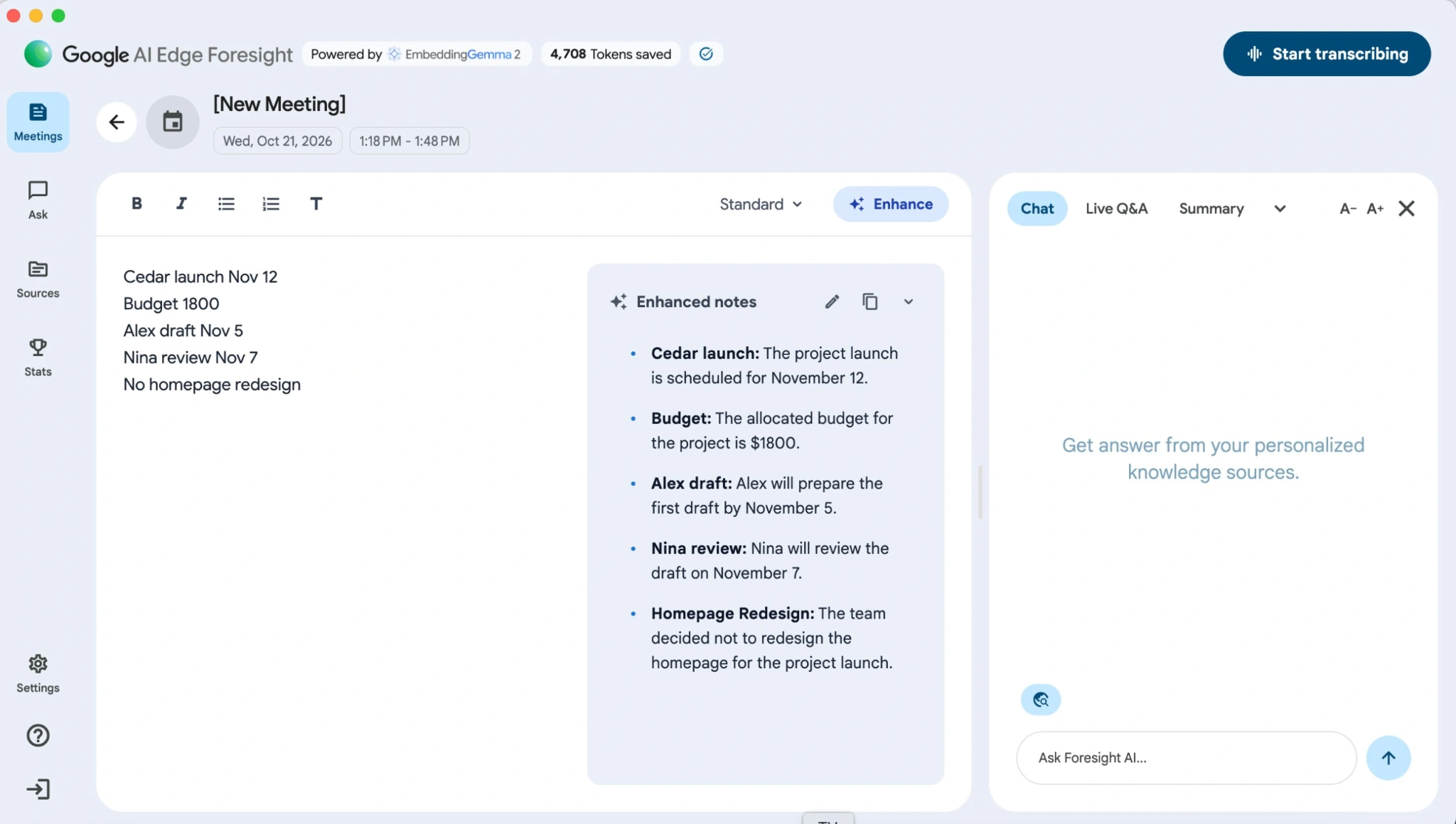
You can type short notes during a meeting, and Live Enhance fills in the details using the transcript. I tried it with five short notes about a project launch. Foresight turned all five into polished notes and kept the dates, budget, and task owners correct.
Your original notes stay visible next to the AI-generated version, much like the split-screen editor shown in our Granola review. This makes it easy to check what Foresight added or changed.
Asking Questions During a Meeting
Foresight also lets you build a knowledge base from local files like PDFs and plain text, project folders, Google Drive, and Calendar.
With Live Assistance, the app can pick up questions during a meeting and look for answers in those materials. Say someone asks when a contract expires. If you've added the document, Foresight can find the date without you having to open the PDF.
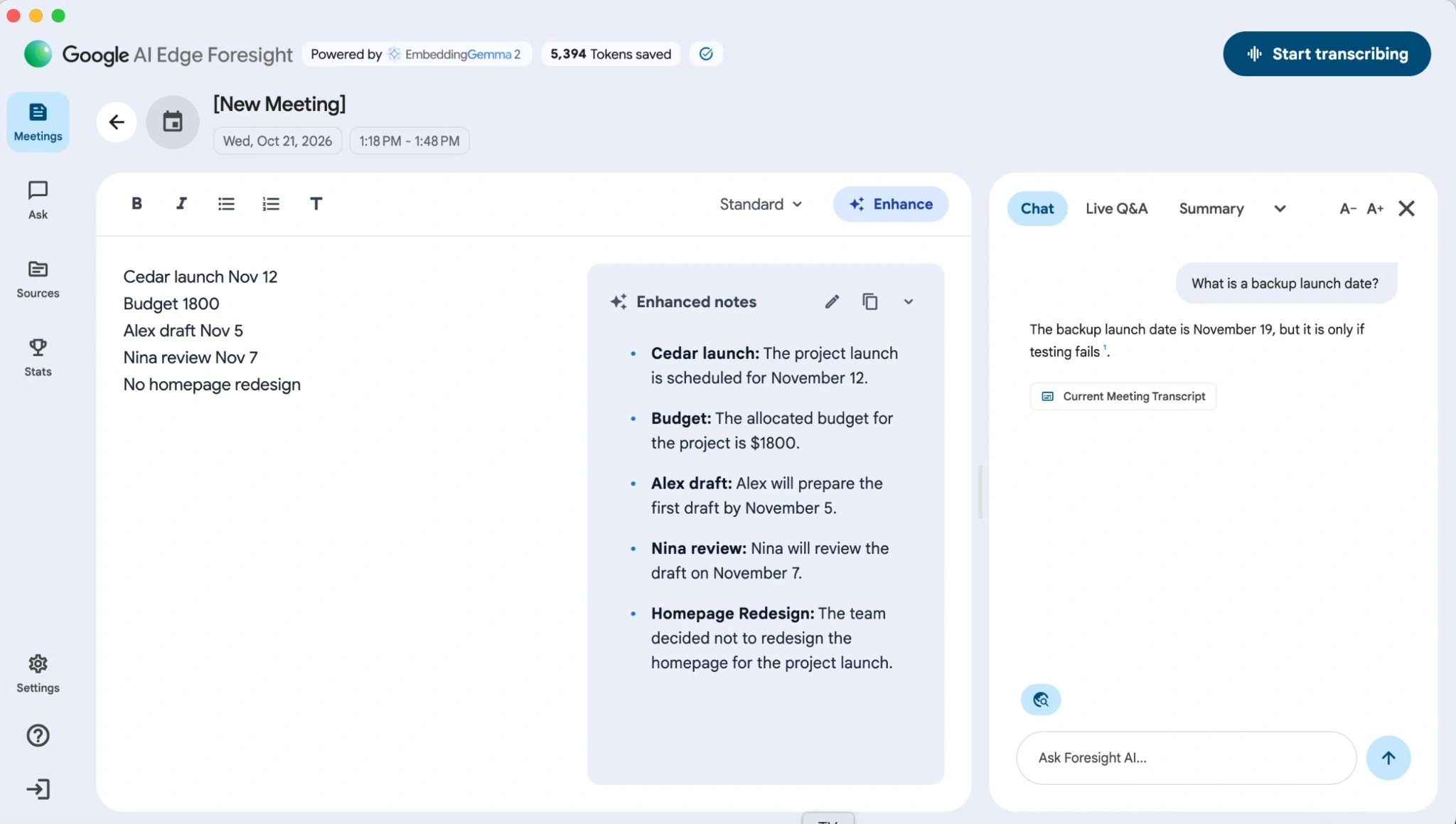
You can also use Chat to ask questions about a previous conversation. I asked Foresight for the backup launch date from the test meeting. It answered correctly, kept the context, and linked the answer to the meeting transcript.
Is Google AI Edge Foresight Really Offline?
As an offline AI note taker, Foresight can transcribe meetings and generate notes without an internet connection. I turned off Wi-Fi during our test, and Foresight continued transcribing without any problems. You'll still need internet access to import files from Google Drive or sync your Calendar.
But offline AI processing doesn't mean the app never communicates with Google. The setup screen clearly states that Foresight collects de-identified usage data when you're online. Your conversations are processed locally, but some information about how you use the app still leaves your Mac.
There's also a background task that can reopen Foresight after you quit the app. It doesn't mean Foresight starts recording without your permission, but it's better to check your Mac's Login Items if you prefer to keep it closed.
So, is Google AI Edge Foresight really offline? Yes, when it comes to processing your meetings. But not completely when it comes to sending data.
You can check the offline functionality yourself. Just disconnect from Wi-Fi and try recording a meeting, using Live Enhance, or asking questions about an imported file.
Where Google Foresight Falls Short
No individual speaker names. Foresight separates your microphone from system audio but can't tell who said what on the other end. This makes it harder to track tasks in group meetings.
Duplicate lines in transcripts. If you're using speakers instead of headphones, your microphone may pick up the same audio twice. This can leave repeated sentences in the transcript.
Limited language support. English works well in early tests, but Japanese, French, and Arabic have caused problems. If your meetings aren't in English, test your language first.
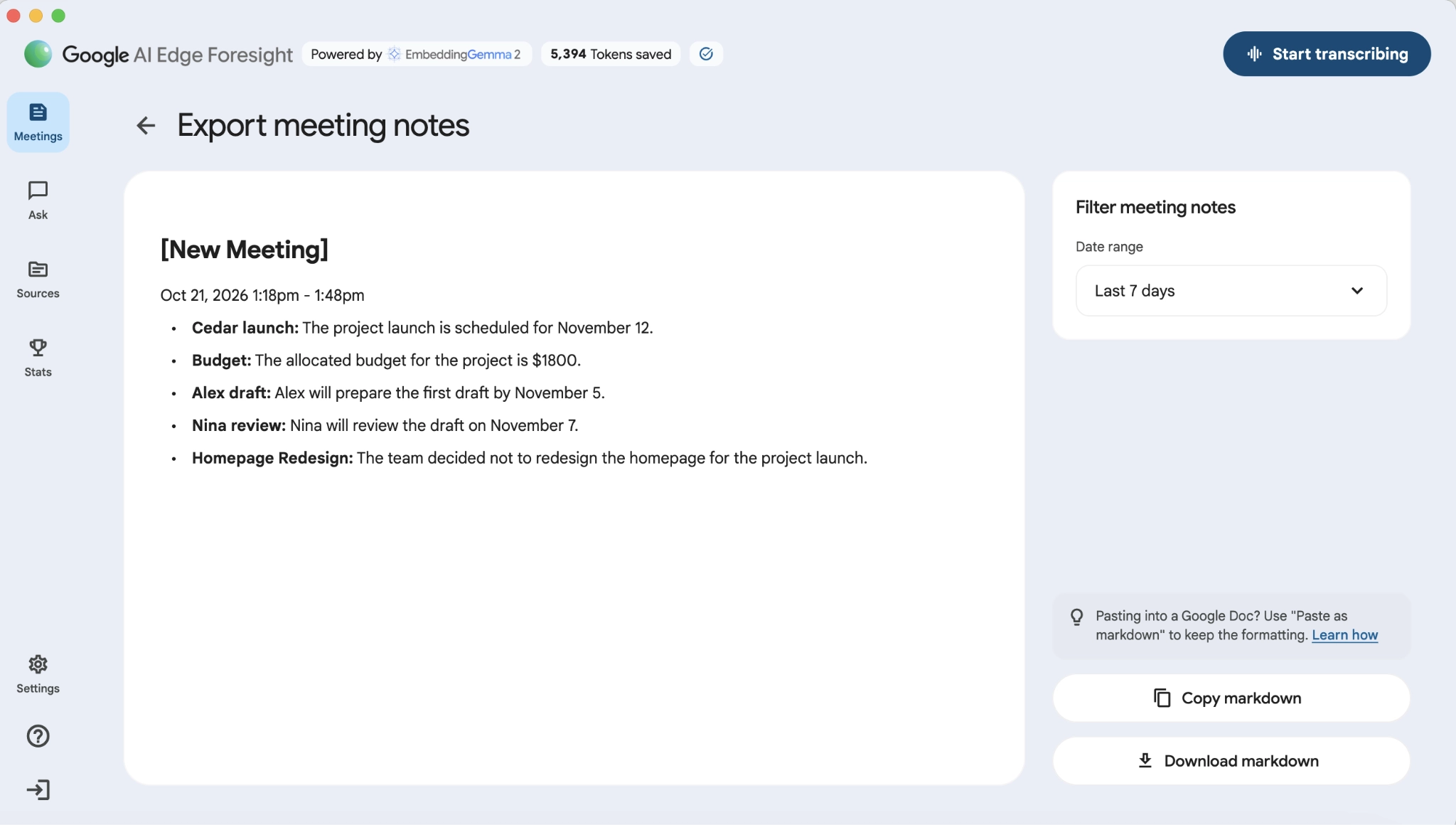
No recording playback. Foresight lets you copy or download your meeting notes as Markdown, but there's no option to listen back to the original audio. You can reopen a meeting and continue transcribing, but you can't replay an earlier conversation to check what someone said.
Who Should Use Foresight?
If you mostly have English-language calls on your Mac and just need notes for yourself, Foresight could be enough. It's free, doesn't add a bot to your meetings, and processes everything on your computer.
But if you need to replay recordings or share them with your team, Foresight won't do the job. You can use it for face-to-face conversations too, though carrying your Mac around isn't always convenient. For meetings away from your desk, AI note takers for in-person meetings that work on your phone are a better fit.
Bluedot: A Better Fit for Meetings Across Devices
If you like Foresight's bot-free recording but need more from your meeting notes, Bluedot is a worth a look.
Bluedot is a secure, privacy-first AI note-taker that records, transcribes, and summarizes online and in-person meetings without sending a bot into your calls. It supports audio and video recording across Chrome, macOS, Windows, iOS, Android, and Apple Watch.
Bluedot is GDPR-compliant, SOC 2 Type II audited, and never uses customer data to train AI models.
So, you're not limited to your Mac with Bluedot. And unlike Foresight, Bluedot saves your recordings, so you can go back and listen to anything you missed. You also get speaker names, AI summaries, and transcripts in over 100 languages. Need to share a meeting with someone who couldn't attend? Just send them the recording or notes.
You can even record conversations from your wrist with Bluedot — an AI note-taker for Apple Watch with a native app.
If you need a local AI note taker, Foresight has the advantage. But Bluedot processes meetings in the cloud and offers SOC 2 Type II compliance and GDPR-compliant data storage in Frankfurt.
Try Bluedot for free with five recordings to see how it works for your meetings before upgrading.
Google AI Edge Foresight Review: Final Verdict
Foresight is worth trying if you want free meeting notes on your Mac. In our test, it transcribed English accurately, expanded our shorthand without losing important details, and worked without Wi-Fi. Just don't expect a full meeting recorder: you can't replay the audio or identify individual speakers.
If you need recordings you can go back to, share notes with your team, or take meetings away from your Mac, Bluedot is a better fit.
Frequently Asked Questions
Is Google AI Edge Foresight free?
Yes. Google's experimental Mac application is currently free, with no subscription required.
Is Google AI Edge Foresight really 100% offline?
Yes, its core AI features work locally. Transcription continued working without Wi-Fi in our test. However, Google says Foresight collects de-identified usage data when you're online.
Does Google AI Edge Foresight work on Windows or PC?
No Windows version is available. Foresight needs an Apple Silicon Mac, not an Intel Mac or Windows PC.
Is there a Google AI Edge Foresight app for iPhone or Android?
No. Google AI Edge Gallery is a different app. If you need to record meetings on your phone, you'll have to look at dedicated AI note takers for iPhone.
Does Foresight join the call as a bot?
No. It captures your microphone and system audio directly from the Mac, without joining the meeting.
Does Google AI Edge Foresight need a Google account?
Not for basic transcription and notes. Connecting Google Drive or Calendar requires sign-in.
Which Macs can run Google AI Edge Foresight?
Apple Silicon Macs with M-series chips. Available model options and performance depend on the hardware.
Does Foresight work in languages other than English?
Possibly, but published tests found problems with several non-English languages. Test your language before relying on it.
Is Google AI Edge Foresight safe for confidential meetings?
Local processing limits exposure to cloud AI services, but it doesn't replace device security, access controls, or recording consent. Teams assessing AI note takers for lawyers should also review its telemetry and retention behavior.
What is the best alternative to Google AI Edge Foresight?
Bluedot is a better match if you want mobile and Windows support, playable recordings, multilingual transcripts, and team sharing rather than exclusively local AI processing.